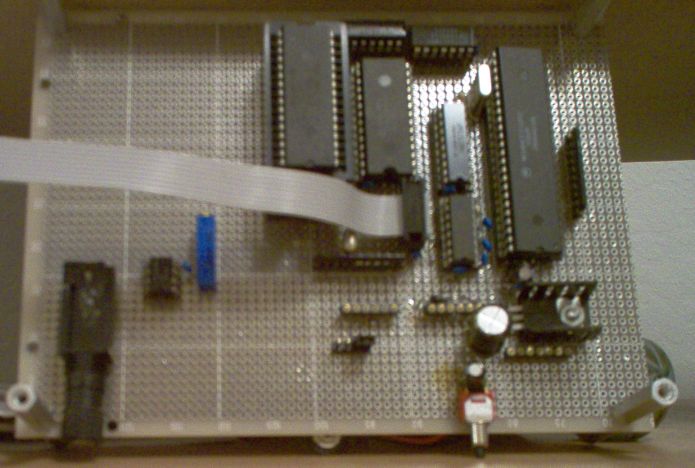
The Differential Music Machine
The Differential Music Machine is an instrument that I created as my final (and only) project for Microprocessor System Design class.
The instrument is powered by a standard DC power supply in the range of 5 - 15 Volts. The instrument receives sends its inputs and outputs through a serial communication line that connects to a host PC. To connect to the board from a PC, you must open a terminal program (such as Terra Term) and connect using the appropriate COM port.
The instrument utilizes 32 KB of external RAM, and 16 KB of external ROM. The address bus for the system is 16 bits, allowing for a total of 64 KB of memory space. However, the extra 16 KB of space (64 total - 32 for RAM - 16 for ROM) is unused, except for a few internal registers on the microcontroller.
The microcontroller is the hobbyists favorite: the Motorola 68HC11. This microcontroller operates at 2 MHZ (plenty of speed for my instrument) and contains several useful general purpose I/O ports, in addition to having an onboard UART port. The HC11 operates in Expanded mode, providing an 8-bit multiplexed data bus along with a 16-bit address bus.
br />
The instrument plays music through an output compare pin on the HC11's Port
A (OC3 for those who have used this MC before). Through this pin, a square
wave of a given frequency can be generated with a 50% duty cycle. My particular
instrument uses frequencies between 1 and 8000 Hz. Frequencies above this
range made my ears hurt. Using some external filtering (a low-pass filter
tuned for about 8 KHZ and a 741 Op-Amp set up to be a unity gain amplifier)
I am able to make this square wave come out sounding somewhat like a sine
wave. The end result is a monophonic instrument that sounds much like Nintendo
music. You can hear a sample of my instrument by listening to
this MP3.
The instrument operates in two modes: Differential, and Absolute. In Absolute mode, the instrument behaves the same as your typical keyboard instrument. Certain keys correspond to certain pitches. The layout of my keyboard in Absolute mode can be seen in the following table:
It is important to note that I use just temperment for all notes in Absolute mode except for A#. This was just because the A# to A switch sounded a little flat.
| Key: | 1 | 2 | q | w | e | r | t | y | u | i | o | p | [ | ] | h | space | z |
| Action: | Down One Octave | Up One Octave | A | A# | B | C | C# | D | D# | E | F | F# | G | G# | Home Note (880 Hz, A) | Stop Note | Change Modes |
In Differential Mode, each key corresponds to a particular change in frequency,
and not in an absolute note. In other words, if the instrument is currently
playing an A, and you hit the +3 (up three half-steps) button, the instrument
will be playing a C. If you press that same button again, the instrument
will then be playing a D# (and you will have just heard a rather nice
tritone).
The layout of my keyboard in Differential mode can be seen in the following
table:
It is important to note that I use equal temperment (or as close as I can
get using small integer ratios) for all notes in Differential mode. This
is because I find it more pleasing to the ear, and more interesting to play
in general.
| Key: | 1 | 2 | 3 | 4 | 5 | 6 | 7 | 8 | 9 | 0 | - | = | q | w | e | r | t | y | u | i | o | p | [ | ] | a | h | space | z |
| Action: | +1 | +2 | +3 | +4 | +5 | +6 | +7 | +8 | +9 | +10 | +11 | +12 (octave) | -1 | -2 | -3 | -4 | -5 | -6 | -7 | -8 | -9 | -10 | -11 | -12 (octave) | +0 | Home Note (880 Hz, A) | Stop Note | Change Modes |
In addition to all of this, the Differential Music Machine is able to play
MIDI files that are transmitted over the serial communications link using
the PC terminal program. Currently support for MIDI files is limited (as
I simply byte bash my way through the decoding process) and so only one tempo
is supported (120 bpm). In addition, only whole, half, quarter, eighth,
sixteenth, thirty-second, dotted-whole, dotted-half, dotted-quarter,
dotted-sixteenth, and dotted-thirtysecond notes are able to be played. All
pitches (between 1 and 8000 KHZ) are able to be played. Fancy things like
triplets, slurs, staccatto, and other note accents are unable to be played.
Most crippling to the MIDI player is the fact that rests are currently unable
to be played.
So far I have mostly used the MIDI player to play Nintendo theme music MIDI
files, as they sound very authentic coming from my board. The
Tetris Theme is my
favorite. However, I can only play monophonic (single channel) MIDI files,
so orchestration is limited. I have been using the lack of support of rests
to put psuedo-bass lines into my single-tracked MIDI files.
Background services that my Differential Music Machine offers are a fairly
accurate real-time clock (errs by about 1 second a month), as well as a RAM
checker which finds bad memory locations for both HC11 internal RAM, and
the external RAM chip. The supported BAUD rates of the serial communications
line are 9600 baud and 4800 baud. The RAM checker and BAUD rate can both
be selected using jumper pins. The music generated by the HC11 board can
be heard by plugging headphone (1/4" or 1/8" stereo headphones) into the
provided headphone jack. It should be noted that the audio is actually mono,
but the mono signal is placed on both audio lines of the headphone jack to
provide simulated stereo sound. The frequency response of the low-pass filter
can be tuned by adjusting the trim-pot on the board.
If I ever work on this board in the future, a few things I would like to
add to this board are:
Vastly increased MIDI playback ability.
Add a second audio channel using another ouput compare pin on the HC11.
Better signal filtering to obtain a slightly more sine shaped signal.
More realistic stereo sound by a purposely introduced delay between the two audio lines of the headphone jack (using a CMOS chip that provides a fixed delay).
In Differental mode, allow the user to select a scale (Major, Minor, Pentatonic, Hungarian, etc) and move around in that scale, instead of being limited to only the chromatic scale. This would allow for faster and more impressive-sounding playing, as any key the user pressed would keep them in the given scale. In this case, +1 would go up 1 note in the scale, which could be any number of semi-tones. Currently users have to be careful which button to press to stay in their scale.
Perhaps expand the ROM to 32 KB (which would mean I would have to lose 64 bytes of RAM due to internal registers) to allow more space for additional programs, or perhaps pre-recorded MIDI files.
And that's it! Thanks for your interest in my project. I'd be happy to answer
any questions you have regarding my project, simply email the address provided
below. In addition, I have kept all of my engineering notes from this project,
and you are welcome to see them if you wish.
Classes | Research | Curriculum Vitae | Home